Location: 800 Battery Avenue SE Atlanta GA 30339

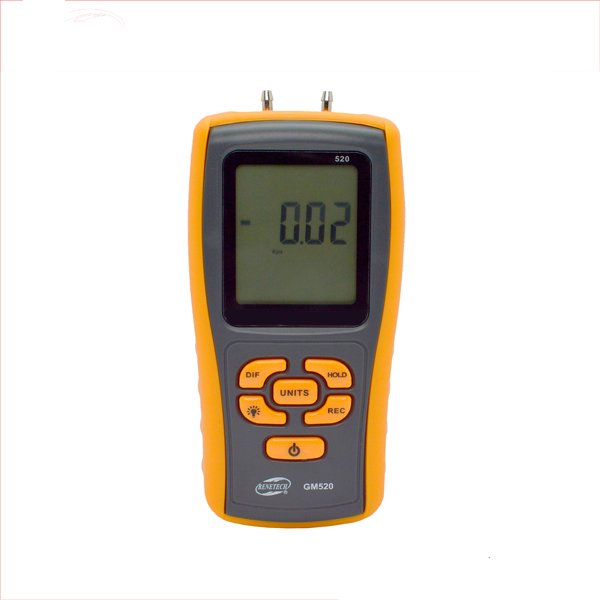
Manometer With Overload Sign (Pressure)
Overview
Acoustic Testing Pro Manometer with down overload indication measures massive pressure of 150kPa with high accuracy.
Key Features
- Low battery indication and automatic power off
- USB port and communication
- Up overload indication
- Power supply 1.5V AAA battery*4
- Data hold
- Large LCD
- Differential mode and record mode
- Reset and data adjustment
Technical Specifications
| Accuracy | ±0. 3% FSO( 25℃) |
| Repeatability | ±0. 2% ( Maximum+/-0. 5% FSO) |
| Linearity/hysteresis | ±0. 29% FSO |
| Response | Typical 0.5 s |
| Low battery indication | Yes |
| Up overload indication | Err1 |
| Down overload indication | Err2 |
| Operating temperature | 0~50℃ |
| Storage temperature | -10~60℃ |
| Power supply | 1. 5 AAA battery*4 |
| USB communication | Yes |
How to Use
Power supply
- Press ON/OFF key to turn the unit on or off
Difference
- Press the DIF key to display the value that is the difference between the current pressure and the pressure value when press the DIF key, with
- DIFFERENTIAL PRESSURE displayed on LCD.
HOLD key
Press HOLD key to hold the reading on the LCD with a “” icon displayed on the upper left corner of LCD, press HOLD key again to go back to normal measuring state.
Record key
- It is available to review MAX/MIN/ AVG values under record mode.
- Press the REC key and the character “” shows on the LCD while all keys except ON/OFF key and backlight will be locked, and time counter works with the current time shows on LCD.
- Press the REC key again, MAX shows on LCD and the maximum value and its pickup time will be shown on the LCD.
- Press the REC key once again, MIN shows on the LCD and minimum value and its pickup time will be shown on the LCD.
- Press REC key again, an average value shows with AVG character.
- Press REC again to show the maximum, minimum and average value repeatedly in order.
- Press the REC key for 2 seconds to exit record mode.
Backlight
- Press the backlight key to activate it.
Auto turn-off
- If there is no any further operation on the key within 1 minute, the unit will turn off automatically. This function can be cancelled by pressing on the HOLD key for a while and then turn the device on until “no” appears on the LCD.
Unit
- Press the UNIT key to show 11 units for option.
USB
- Built-in USB port allows connection with PC.
Error
- If there is any mistake reading appears, it will be shown on the LCD as following:
- Err1:Pressure beyond positive range
- Err2:Pressure beyond negative range (3) Err3:DIF difference beyond position limit (4) Err4:DIF difference beyond negative limit
Battery replacement
- Flashes when the battery is insufficient, replace
- it with 4 1.5V AAA batteries.
Reviews
There are no reviews yet.